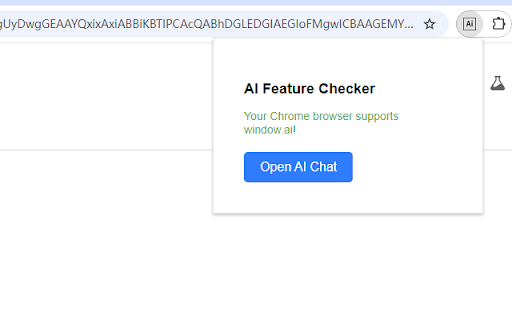
AI Feature Checker - Chrome Extension

AI Feature Checker - Chrome Extension: ai tool to verify AI support in Chrome

AI Feature Checker - Chrome Extension: A must-have ai tool to instantly verify AI support in Chrome—fast, reliable, and built for developers.

🟢

AI Feature Checker - Chrome Extension - Introduction

AI Feature Checker - Chrome Extension Website screenshot

What is AI Feature Checker ai chrome extension?

AI Feature Checker is a lightweight, developer-first Chrome extension that instantly detects whether your browser has native AI capabilities—specifically, the experimental window.ai API. Built for speed and clarity, it delivers real-time verification without requiring manual flag toggling or console commands.

How to use AI Feature Checker ai chrome extension?

Simply add AI Feature Checker from the Chrome Web Store, click its icon in the toolbar, and get an immediate status report: ✅ Supported, ⚠️ Partially enabled, or ❌ Not available. If support is missing, the extension walks you through enabling required experimental flags—step-by-step, with context-aware guidance tailored to your Chrome version.

🟢

AI Feature Checker - Chrome Extension - Key Features

Key Features From AI Feature Checker ai chrome extension

One-click AI capability detection in real time

Smart, version-aware setup instructions for window.ai

Lightweight design—zero external dependencies, no background noise

AI Feature Checker ai chrome extension's Use Cases

Validate AI readiness before building or testing AI-powered web apps

Accelerate local development workflows with instant environment feedback

Educate teams on Chrome's evolving AI feature rollout and compatibility

🟢

AI Feature Checker - Chrome Extension - Frequently Asked Questions

FAQ from AI Feature Checker - Chrome Extension

What is AI Feature Checker?

A streamlined Chrome extension that answers one critical question: *Does my browser support the window.ai API?* It combines detection logic with actionable next steps—no guesswork, no devtools diving.

How to use AI Feature Checker?

After installation, click the extension icon to run an instant check. If AI features are disabled, it shows precisely which chrome://flags to enable—and warns if your Chrome version is too old to support them.

What is the main purpose of AI Feature Checker?

To eliminate uncertainty during AI web development. Whether you're prototyping with AIModel, testing inference APIs, or auditing browser compatibility, this tool confirms foundational AI support in under two seconds.

Is AI Feature Checker available in multiple languages?

Yes—it automatically adapts its interface and instructions to your browser’s language setting, currently supporting English, Español, and 中文—with more locales added based on community demand.